Buyer guide
Field-level encryption for Cornerstone Forms.
Last updated: June 16, 2026
What is field-level encryption for Cornerstone Forms?
Field-level encryption for Cornerstone Forms means selected form fields are encrypted before they are stored in WordPress, while lower-risk fields can remain readable for reporting, routing, search, payment feeds, or CRM workflows.
The point is not to make a WordPress site "compliant" by itself. The point is narrower and more practical: reduce the amount of sensitive submission data that remains readable in the WordPress database, exports, backups, or admin screens unless an authorized user intentionally decrypts it.
When this matters
Field-level encryption is most useful when a form collects a mix of ordinary operational data and private values. For example, a site may need to keep a submission status readable while protecting a health detail, legal note, identity number, private message, or uploaded document.
Client intake
Protect private notes or uploaded documents while keeping routing fields readable.
HR and hiring forms
Encrypt candidate-sensitive answers without moving the whole workflow outside WordPress.
Support and member portals
Reduce plaintext exposure for messages that may include private account details.
Agency maintenance
Give clients a repeatable protection layer without custom encryption code per site.
How Cornerstone Forms Encryption works
- Install the plugin and add the site encryption key.
- Open the Cornerstone Forms field settings and enable Encrypt Field on the fields that carry private data.
- Submit a test entry and confirm the protected values decrypt only for authorized WordPress users.
- Use blind indexes only where exact-match search is needed on encrypted fields.
- Keep the encryption key backed up outside ordinary support tickets, screenshots, and shared documents.
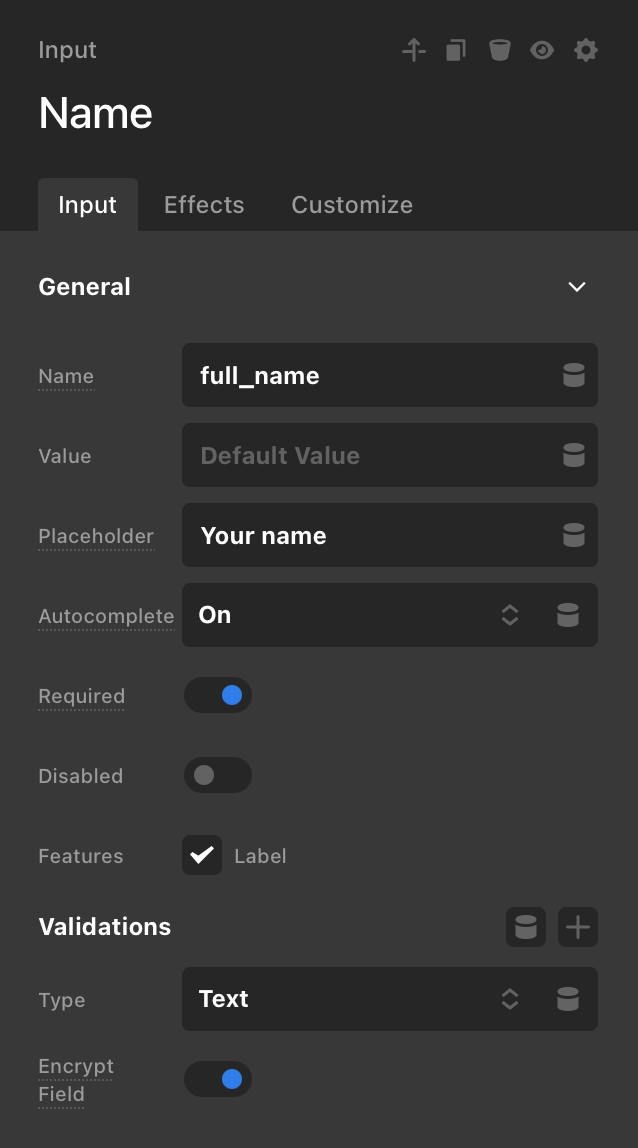
What the setting looks like
Encryption is a field setting, not a separate form workflow.
The screenshot shows the existing Cornerstone field editor with Encrypt Field turned on. Teams can keep using their current forms and protect only the fields that carry private data.
Field-level encryption vs other controls
| Control | What it helps with | What it does not replace |
|---|---|---|
| HTTPS | Protects data in transit between browser and server. | Does not protect data after WordPress stores it. |
| Hosting security | Improves server, network, backup, and account protection. | Does not make selected form fields unreadable inside WordPress storage. |
| Access control | Limits which users can view or manage submissions. | Does not reduce exposure in database exports or mishandled backups. |
| Hosted form platform | Moves intake and storage to a dedicated third-party workflow. | May be too much operational change for an existing Cornerstone Forms site. |
| Field-level encryption | Encrypts selected stored values while keeping the existing form builder. | Does not replace legal review, consent wording, retention policy, or incident response. |
What the license server never receives
Cornerstone Forms Encryption is designed so the commercial store handles licensing and updates, not form processing. The license API should not receive submissions, uploaded files, encrypted values, decrypted values, encryption keys, search keys, or audit logs.
Common buyer questions
Should every field be encrypted?
No. Encrypt fields that carry meaningful risk. Keep low-risk fields plain when reports, routing, automations, or integrations still need normal readable values.
Can encrypted fields still be searched?
Yes, for configured exact-match cases through HMAC blind indexes. This is not the same as full-text search over plaintext.
Does this make a site GDPR compliant?
No. It can support data minimization and storage-protection goals, but the site still needs lawful basis, notices, retention policy, access controls, processor review, and operational procedures.
What happens if the key is lost?
Existing encrypted values cannot be recovered. Treat the encryption key as production secret material and back it up accordingly.
Need this for an existing Cornerstone Forms site?
Review the security model and compatibility notes, then choose the annual license that matches the number of production sites you need to activate.