New Built for Cornerstone Forms

Encrypt private form fields before they touch the database.

A focused WordPress plugin for Cornerstone Forms installs that collect sensitive data. Pick the fields, encrypt new values with AES-256-GCM, protect uploads, control decrypt access, and keep update delivery behind a paid license.

Cornerstone Forms WordPress admin Private updates
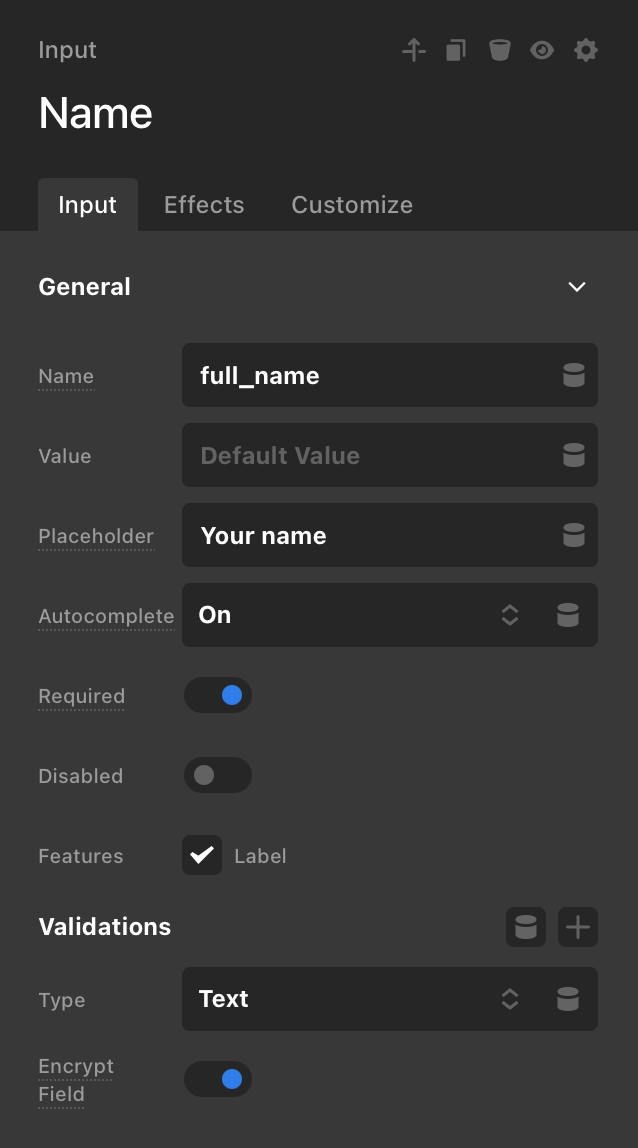
Cornerstone Forms field settings showing the Encrypt Field toggle enabled for a Name input.

Actual Cornerstone panel

Turn encryption on from the field settings.

The plugin adds an Encrypt Field control where the form is already being configured. Designers can keep building in Cornerstone while the site owner decides which fields need storage protection.

Field-level control Required fields still work Submissions encrypt on save

Form data stays on the client site. Licensing stays on the store.

The plugin does the sensitive work inside WordPress: encrypting values, protecting uploads, checking roles, and recording decrypt activity.

The store only handles commercial access: license activation, update metadata, private release downloads, and Stripe billing.

Everything needed to protect selected submissions.

01

Field encryption

Choose which Cornerstone Forms fields should be encrypted before storage.

02

Protected uploads

Encrypt uploaded files that belong with sensitive submissions.

03

Role access

Limit who can decrypt values from wp-admin without changing form flow.

04

Blind search

Search configured encrypted fields through HMAC indexes, not plaintext.

05

Audit trail

Record decrypt actions so admins can review who accessed protected values.

06

Retention controls

Keep sensitive submissions for as long as the form actually needs them.

Encryption happens in the normal WordPress submission flow.

Cornerstone keeps collecting forms. The plugin steps in around storage, readback, search, and file access.

01

Choose protected fields

Mark the fields that should be encrypted. Leave low-risk fields plain when they still need normal reporting or integrations.

02

Save submission

On save, selected values are written with an ENC:: prefix. New values use AES-256-GCM; legacy CBC payloads remain readable.

03

Protect matching uploads

Files referenced by encrypted fields are converted to encrypted CFEF2 payloads and served through permission-checked download URLs.

04

Read only when allowed

Authorized users can view decrypted values in wp-admin. Role rules, user-owned mode, and async password checks can narrow access.

No form entries are sent to the license API.

License checks are deliberately boring. The API needs to know whether a site may receive updates. It does not need submissions, files, encryption keys, audit logs, or decrypted values.

Stays in WordPress

Submissions, encrypted uploads, encryption keys, audit logs.

Sent for activation

License key, normalized site URL, plugin version, WP/PHP versions.

Gated by the store

Update metadata and short-lived private ZIP downloads.

Security switches for different kinds of forms.

Use the stricter settings only where they help. A newsletter form and a legal intake form should not need the same access policy.

Role-based access

Select which WordPress roles may see decrypted values. Administrators keep full settings access.

User-owned mode

Restrict users to submissions that belong to them, useful for client portals and account areas.

Async password

Add a second password check before encrypted data is displayed. The plugin rate-limits failed attempts.

Delay encryption

Let payment, CRM, or email feeds process first, then encrypt after a short configured delay.

Blind indexing

Find exact matches for configured fields using HMAC-SHA256 indexes without storing plaintext search values.

Retention cleanup

Replace protected values with [Deleted] after the configured retention window.

Built for existing sites, not only fresh installs.

You can activate the plugin on a site that already has Cornerstone Forms submissions, then use batch tools to bring old records under the same protection policy.

Batch encrypt Encrypt existing entries by form and field list, with adjustable batch size for larger datasets.
Batch decrypt Reverse encryption when you intentionally need to remove protection from stored records.
Encrypted search Search configured fields by exact value through blind indexes, then open matching submissions.
Audit log Review decrypt, search, file download, and batch operation activity with user and timestamp context.
System status Check OpenSSL, encryption key source, search key status, Action Scheduler, and plugin version.

Expired licenses stop downloads, not decryption.

If billing lapses, the plugin keeps working on the installed site. Admins see a license notice, and the updater stops receiving new ZIPs until the subscription is renewed.

Install, add keys, activate license.

The encryption key belongs to the WordPress site, not the store. Keep it backed up with the same care as any other production secret.

Requirements

  • WordPress 5.0+
  • PHP 7.4+ with OpenSSL
  • Cornerstone Forms installed
  • Action Scheduler recommended for delay and retention jobs

Configuration

  • Add CS_FORMS_ENCRYPTION_KEY in wp-config.php or the environment.
  • Add a distinct CS_FORMS_SEARCH_KEY when using encrypted search.
  • Configure plugin settings in Settings > CS Forms Encryption.
  • Activate updates in Settings > Encryption License.

Use it when forms collect data you would not want sitting in plain post meta.

Client intake Legal requests Medical-adjacent forms HR applications Support cases Private document uploads

The plugin helps reduce exposure of stored form data. It is not a full compliance program by itself; site policy, hosting, access control, backups, and operational process still matter.

Three annual licenses.

Stripe Checkout handles payment. License keys are issued after checkout.

Solo

$79 / year

For one production site that needs protected form submissions.

  • 1 site activation
  • Private updates
  • Stripe customer portal

Agency

$299 / year

For repeat Cornerstone Forms work across multiple client sites.

  • 10 site activations
  • Private updates
  • Agency-friendly license pool

Prices are in USD. A canceled subscription keeps the installed plugin running but stops future updates and downloads.

Short answers before checkout.

Is the plugin GPL?

Yes. The paid license covers updates, gated downloads, and support.

Does the license server receive form submissions?

No. License and update requests do not include form entries, uploaded files, encrypted values, audit logs, encryption keys, or search keys.

Can I search encrypted fields?

Yes, through blind indexes for configured fields. The plugin stores HMAC-SHA256 search indexes, not plaintext search terms.

Can I encrypt submissions that already exist?

Yes. Use the Batch Encrypt tool from the plugin settings. You can choose a form, provide a field list, and process entries in batches.

Are uploaded files encrypted too?

Yes, when an encrypted field references an uploaded file. The plugin encrypts the file payload and serves it through a permission-checked download endpoint.

Will it break CRM, email, or payment feeds?

Use Delay Encryption when another feed needs the plaintext value first. The feed can process the submission, then the plugin encrypts the configured fields after the delay.

What does the paid license cover?

The plugin is GPL. The license covers gated ZIP downloads, WordPress updater access, renewals, and support. If the license expires, installed encryption does not stop.

What happens if the encryption key is lost?

Existing encrypted values cannot be recovered. Back up the WordPress encryption option or environment value like any other production secret.

Can I change the encryption key later?

Changing the key will make existing encrypted values unreadable unless you intentionally decrypt and re-encrypt data during a planned rotation.